
Publish
Publish a small web app. Get paid when people play it.
lilyhop is built for small web apps — single-file games, little tools, quick experiments. Free to publish, fair to share, and you can ship straight from a Claude chat.
of the royalty pool goes back to publishers
publish fee — now and forever
apps per publisher (after a short editorial review)
Build a small web app
A single HTML file. Use Claude, ChatGPT, whatever helps you ship. Games, utilities, weird stuff — anything that fits in an iframe.
Sign in to lilyhop
Sign in with Google. You get a publisher account, a dashboard, and a one-time-shown API key (you only need that for non-Claude workflows — see below).
Publish from Claude
Add the lilyhop Connector in claude.ai (one-time — one-click button below), then in any chat ask Claude to publish your artifact. It calls the publish_to_lilyhop tool, you approve, and the play URL comes back inline.
People play. You get paid.
lilyhop counts engagement seconds — actual interactive time, not page views. At the end of each royalty period, 85% of the subscription pool is split proportionally. Tier up to 90% once your lifetime payout crosses our threshold.
Publish from Claude in three steps
Works from any claude.ai chat. The connector is a one-time setup; it survives across chats and devices.
Add lilyhop to Claude
Add lilyhop to Claude →Opens claude.ai with the name and URL already filled in — review, click Add, then Approve. (claude.ai shows a quick “verify this URL” notice because the link came from us — that's expected.)
Prefer to add it by hand?
- 1In claude.ai, click your name → Settings → Connectors.
- 2Click Add custom connector.
- 3Name:
Lilyhop. URL:https://lilyhop.com/api/mcp. Leave the OAuth fields blank — lilyhop registers Claude automatically. Click Add. - 4Claude pops you over to a lilyhop consent page (you should already be signed in). Click Approve.
- 5Done — the connector is now available in every chat.
Build your game
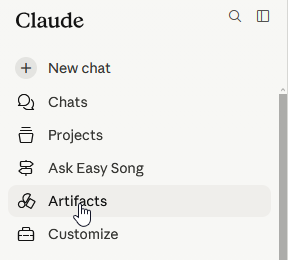
Open a new chat and make something. Artifactsis the easiest way to build a single-file web app — pick it from Claude's sidebar and describe what you want.
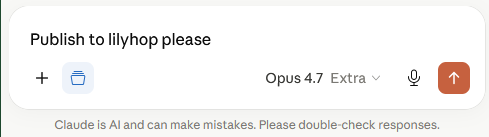
Ask Claude to “publish to lilyhop”
That's it. Claude calls the publish tool, you approve, and your play URL comes back right in the chat.
Revoke any time from the Connectors panel in claude.ai. The lilyhop dashboard shows what's published under your account.
Other ways to publish
Claude Code / Claude Desktop (local stdio MCP)
If you prefer a local MCP server (e.g., to keep publishing scoped to a project, or for use with Claude Code), there's a stdio version in the repo at mcp-server/.
Install:
git clone https://github.com/real-easy-song/lilyhop.git
cd lilyhop/mcp-server
npm install
Wire it into Claude Code (use the plaintext API key from your dashboard):
claude mcp add lilyhop \
  --env LILYHOP_API_KEY=lh_your_key_here \
  -- node /absolute/path/to/lilyhop/mcp-server/index.js
Full instructions and the Claude Desktop config snippet are in mcp-server/README.md.
From an agent with no account or API key (publish first, claim later)
If an agent doesn't have a Lilyhop connector or API key, it can still publish: POST to /api/publish with no Authorization header. The response includes a one-time claim_url the agent shares with you — you visit it, sign in once, and the app attaches to a new (or existing) Lilyhop account in one click.
Claim URLs expire 30 days after publish. Anyone with the URL can claim the app, so treat it like a password.
The canonical machine-readable docs for agents live at /llms.txt. Most users won't need this — just say “publish to lilyhop” and an LLM with web access can figure out the rest.
Raw HTTP (curl, any HTTP client)
POST JSON to https://lilyhop.com/api/publish with your API key as a Bearer token:
curl -X POST https://lilyhop.com/api/publish \
  -H "Authorization: Bearer lh_your_key_here" \
  -H "Content-Type: application/json" \
  -d '{
    "title": "My App",
    "short_description": "...",
    "category_slug": "games",
    "html_base64": "<base64-encoded-html>"
  }'
Returns { slug, app_id, version_id, play_url }.
Valid category_slug values: games, learning, productivity, creative, utilities.
What we won't accept
- Apps that try to phone home to track users beyond what lilyhop already does for royalty calculation.
- Spam, scams, NSFW content, anything that violates basic safety expectations.
- Anything explicitly designed to game engagement-seconds (auto-clickers, fake interactivity).